Blur, Highlight & Annotate Screenshots Instantly – 100% Private
The fastest way to edit screenshots for testers, professionals, teachers, and everyday users. No uploads. No sign-ups. 100% privacy guaranteed.
Android app is live on Google Play. iPhone app coming soon.
Use uBlur on Android
Install uBlur from Google Play for on-device editing and export. iOS support is in progress.
 Install the Android app
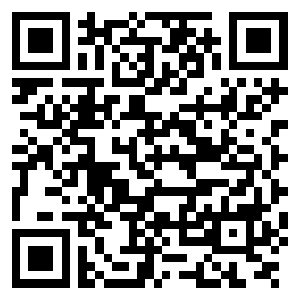 Scan to open the Play Store listing
The Privacy-First Solution for Instant Image Redaction
uBlur is a high-performance, browser-based image editor designed for professionals who need to redact sensitive information quickly and securely. In today's digital landscape, sharing screenshots is essential for collaboration, yet it often carries the risk of accidental data exposure. uBlur solves this by providing powerful blur, highlight, and annotation tools that operate entirely within your local browser environment.
By leveraging modern web technologies like Canvas and local storage, uBlur eliminates the need for any server-side processing. This architectural choice means your sensitive documents, personal identifiers, and proprietary interfaces never leave your machine. Whether you're a QA engineer redacting PII from a bug report, a teacher preparing lesson materials, or a developer sharing UI feedback, uBlur offers a zero-compromise approach to both utility and security.
Our mission is to provide a friction-less editing experience that respects user sovereignty. With uBlur, there are no accounts to create, no subscriptions to manage, and most importantly, no data privacy concerns. It's the professional's choice for fast, reliable, and private image annotation.
🔒 Blur Sensitive Info
Quickly hide emails, usernames, and confidential details in just one drag.
✨ Highlight What Matters
Draw attention to specific areas with colored highlights and shapes.
📝 Add Text & Labels
Easily annotate screenshots with notes, captions, and custom text labels.
⬇️ Instant Export
Download your edited image instantly with no watermarks or sign-ups.
Why Choose uBlur for Your Image Editing?
In an era where data privacy is paramount, uBlur stands out by ensuring that your sensitive information remains exactly where it belongs—on your device. Unlike traditional online editors that require you to upload files to their servers, uBlur processes everything locally using advanced browser-side technologies. This means your images never touch our servers, providing an unbreakable layer of security for your confidential data.
⚡ Unmatched Speed
Experience lightning-fast editing with zero server latency. Since all processing happens in your browser, actions like blurring and highlighting are instantaneous, allowing you to ship your work faster.
🔐 Absolute Privacy
Your privacy is not just a feature; it's our core principle. We utilize local-first processing, ensuring that even we cannot see your images. This makes uBlur the ideal tool for handling PII, financial data, and internal company screenshots.
🛠️ Professional Grade Tools
Designed specifically for high-stakes environments like QA testing and professional documentation. Our tools are precise, reliable, and built to handle the rigorous demands of modern workflows.
🆓 Genuinely Free
No hidden costs, no premium tiers, and no intrusive watermarks. uBlur provides professional-quality redaction and annotation tools for everyone, completely free of charge.
Who is uBlur Built For?
uBlur is the go-to solution for thousands of professionals who value speed and privacy in their daily visual communication.
👨💻 QA & Software Testers
Quickly redact sensitive customer data from bug reports without compromising on the clarity of the issue. Ideal for Jira, GitHub, and Slack workflows.
👩🏫 Educators & Trainers
Create clear, focused tutorial screenshots by highlighting key steps and blurring out distracting or unrelated UI elements.
📄 Content Creators
Prepare clean, professional visuals for blog posts and social media that maintain your brand's aesthetic while protecting your personal information.
🏢 Corporate Professionals
Safely share internal metrics or interface mockups in presentations by redacting confidential identifiers and proprietary data points.
Getting Started with uBlur
Mastering uBlur is simple and takes less than a minute. Follow these three easy steps to create professional, redacted images.
Import Your Image
Simply drag and drop your file or use the global paste shortcut (Ctrl/Cmd + V) to bring your screenshot into the editor.
Apply Redactions
Use our precision blur and fill tools to cover sensitive data. Add highlights to guide your viewer's eye to exactly what matters.
Download & Share
Export your finalized image in high-quality PNG or JPG format. Your original file never left your computer.
📚 Learn More
Explore our tutorials and guides to get the most out of uBlur:
Common Questions About uBlur
Is uBlur truly free for everyone?
✅ Absolutely. uBlur is 100% free to use for both personal and commercial purposes. We don't believe in paywalls or hiding features behind subscriptions. Our goal is to make privacy-first image editing accessible to everyone without watermarks or hidden costs.
What happens to my images when I edit them?
🔐 Nothing leaves your browser. uBlur is a "local-first" application, meaning all the code runs on your machine. We never upload your files to any server. Your screenshots are processed in-memory within your browser tab and are discarded as soon as you close it.
Do I need to sign up or provide an email?
🙅 No registration required. We value your time and privacy, so we've eliminated the friction of account creation. You can start editing the second you land on the site. No emails, no passwords, and no tracking of your identity.
Which browsers and devices are supported?
🌐 uBlur is optimized for modern browsers including Chrome, Firefox, Safari, and Edge. While it's primarily designed for desktop use where precision editing is easiest, it also supports basic functionality on tablets and mobile devices.
What Users Say
“uBlur is the fastest way to redact sensitive info for bug reports. It's my go-to tool every day!” – Sarthak, QA Test Engineer